Star Citizen Blueprint Finder Guide: how to read contract rewards without wiki-hopping
Blueprint hunting gets a lot less annoying when you stop guessing. This guide shows you how to use the finder, how to read the contract labels, and what a new pilot should watch for before accepting a mission.
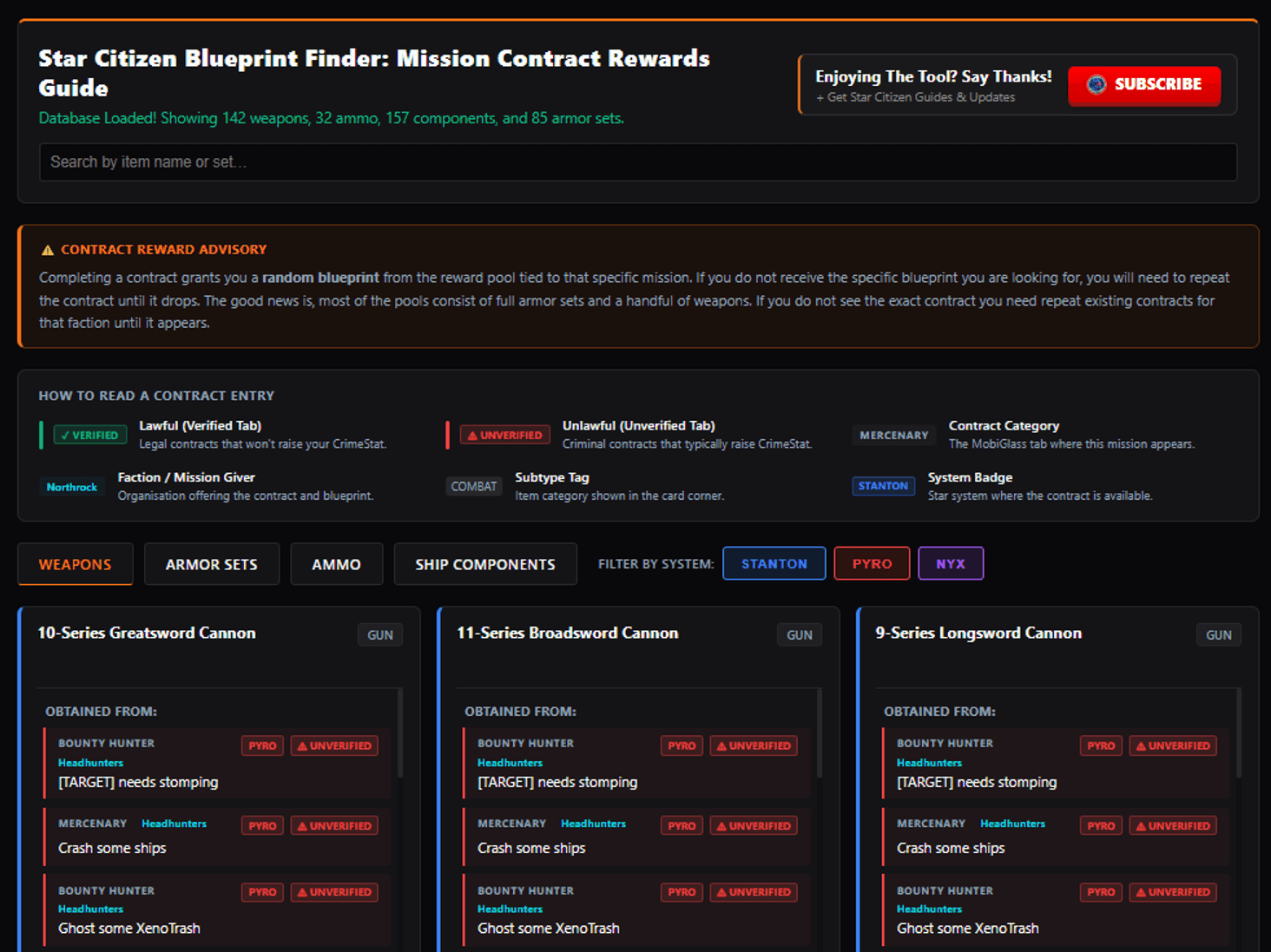
Hero image: the blueprint finder is about matching an item to a contract pool, not memorizing every mission by heart.
What it does
It helps you find where a weapon, armor set, ammo type, or ship component blueprint is tied to a contract or mission.
Why beginners should care
It saves time, cuts down on wiki-hopping, and helps you avoid accepting the wrong kind of contract by mistake.
Best habit
Search the item first, then read the system badge and lawful/unlawful label before you click accept.
Use it as a map, then verify the contract in game.
The blueprint finder is useful because it turns a vague goal into a specific contract path. That matters for new pilots: less wandering, fewer bad accepts, and a clearer idea of whether a blueprint run is worth your time. Just keep the reward pool warning in mind — the tool helps you find the job, but it does not make the drop guaranteed.
Ready to enlist?
Start on the official RSI site
This enlist link includes the referral code for new accounts so the official new-player bonus can attach during signup.
Enlist on RSIReferral disclosure: if you create an RSI account using this referral code, you receive the official new-player bonus, and this site owner may receive referral rewards.
The fastest way to waste time in Star Citizen is to know the item name and still not know where the game hides the contract for it. That is the hole this blueprint finder fills. It gives you a cleaner path from “I want that” to “there is the contract” without forcing you to bounce between a dozen wiki tabs.
For a new pilot, the win is not mastering every blueprint on day one. The win is learning how to read the tool well enough to make one clean decision: is this a lawful contract I can follow, or am I about to wander into a mess I do not need yet?
What the blueprint finder is actually good for
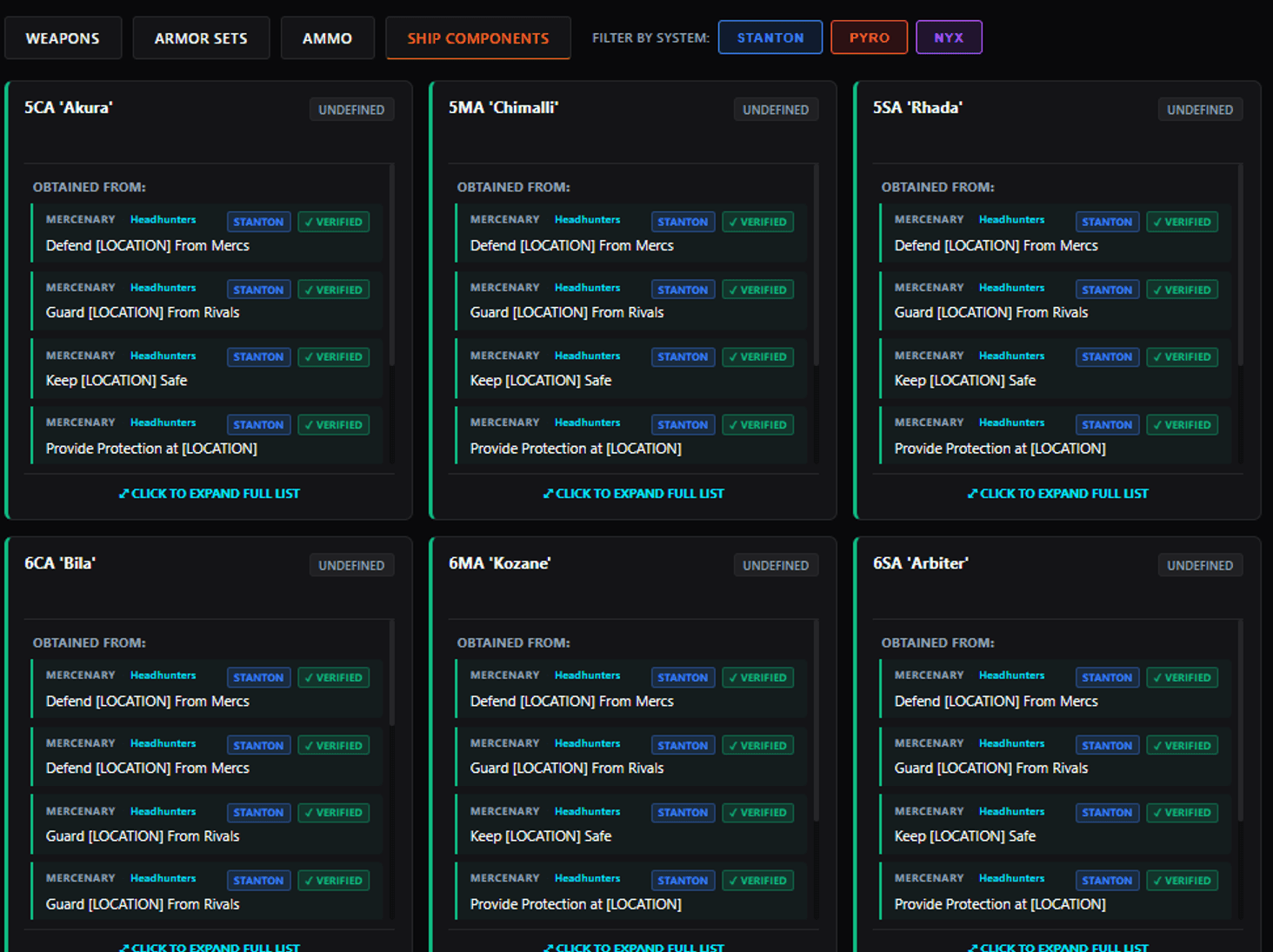
The live tool currently organizes items around a few useful buckets: weapons, armor sets, ammo, and ship components. That matters because the tool is not trying to be a shopping list. It is trying to help you connect a thing you want with the contract pool that can drop it.
If you are new, that is enough. You do not need to learn the whole crafting ecosystem first. You just need to know whether the thing you want is tied to a contract, what system it lives in, and whether the mission is the safe route or the risky one.
How to read the contract entry
The interface gives you a few labels that are worth slowing down for. They are not decoration. They tell you where to look and how careful to be.
| Label | What it means | Why you care |
|---|---|---|
| System badge | Which system the contract appears in, such as Stanton, Pyro, or Nyx. | It helps you stop chasing a mission in the wrong place. |
| Lawful / Verified | The safer tab, according to the tool. | Good default for beginners who do not want surprise CrimeStat problems. |
| Unlawful / Unverified | The riskier tab, according to the tool. | Useful later, but not the easiest place to learn the loop. |
| Contract category | The mobiGlas tab where the mission appears. | Helps you stop hunting in the wrong mission bucket. |
| Faction / mission giver | The group offering the job and the blueprint pool. | Tells you who owns the contract and where the reward comes from. |
| Subtype tag | The item family shown on the card. | Useful when you are choosing between weapons, armor, ammo, or components. |
How to use the tool without overthinking it
- Search the item name first. Start with the weapon, armor set, ammo, or component you actually want.
- Pick the right system filter. If you are planning to stay in one area, narrow the view so you are not sorting through every contract on the page.
- Read the lawful/unlawful badge. This is the part that keeps beginners out of preventable trouble.
- Check the contract label and mission giver. That tells you where the reward is coming from and where to look in-game.
- Assume you may need more than one run. The tool’s own warning says the reward comes from a pool, so a clean search is not the same thing as a guaranteed drop.
That is the whole trick. The tool is doing the heavy lifting so you do not have to. Your job is to read the filters in the right order and stop accepting contracts just because the name looks close enough.
What the tool does not do for you
This is the part that keeps the guide honest. The finder can shorten the hunt, but it cannot play the game for you.
- It does not guarantee a first-run drop.
- It does not make an unlawful contract safe.
- It does not tell you whether the run is worth it for your current skill level.
- It does not replace the basic habit of checking the mission details before you accept.
If you are brand new, that last point matters most. The best use of a blueprint finder is not to squeeze every possible reward out of the game. It is to keep you from making a simple job more confusing than it needs to be.
Common beginner mistakes
- Searching too broadly. If you know the item, type the item. Do not start by hunting every category at once.
- Ignoring the system filter. That is how people end up chasing contracts in a place they were never planning to visit.
- Skipping the lawful/unlawful badge. It is the quickest way to walk into a CrimeStat headache you could have avoided.
- Assuming one run equals one drop. The tool is clear that blueprint rewards come from a pool, so repetition may be part of the job.
What a new pilot should do next
If you are still in the “I just want to understand the game” phase, keep the next step small. Use the blueprint finder when you already know the item path you want, but keep your early sessions simple: one account, one starter ship, one clean loop, one reason to log back in.
Once you get comfortable with that rhythm, tools like this become genuinely useful instead of just another thing to stare at. That is the right place for a helper app to sit.
Copy the referral code before you go blueprint hunting
If you have not made the RSI account yet, do that first. Once the signup is done, come back and use the blueprint finder when you know exactly what item you are chasing.
Go to official RSI siteReferral disclosure: if you create an RSI account using this referral code, you receive the official new-player bonus, and this site owner may receive referral rewards.
What this guide drew from
This is an original Verse Pilot guide built from CMDR Quattro's Community Hub tutorial post and the live Citizen Starter Guide tool. It explains how to read the interface and make a beginner-safe choice, rather than mirroring the source wording or layout.
- RSI Community Hub — Star Citizen 4.8 Crafting Blueprint Finder Tool
- Citizen Starter Guide — Star Citizen Blueprint Finder
- Roberts Space Industries — official home and account entry point
Media credits
- Hero image: screenshot from the RSI Community Hub post by CMDR Quattro.
- Supporting image: screenshot from the RSI Community Hub post by CMDR Quattro.
- Images are used for editorial commentary and beginner onboarding context.
FAQ